Creative Colors Coloring Game
Reviews
Description
Game Introduction
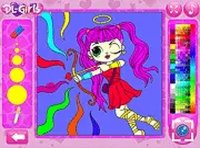
Creative Colors is an online coloring game designed to inspire creativity in players of all ages. It offers a wide selection of coloring pages sorted into fun categories, as well as a freehand drawing mode. The game features an endless color palette and multiple brush types, allowing for precise and imaginative artwork. Players can upload their own images or photos to color and customize, making each session unique. A night mode option helps protect eyes during extended play. Once finished, artwork can be saved to a device or printed directly from the browser. Creative Colors runs smoothly without any downloads, making it accessible on both mobile and desktop devices.
How to Play
To begin, choose a coloring page from the available categories or select the drawing mode to create original artwork. Pick any color from the endless palette and select a brush that suits your style. Apply colors with taps or clicks for precise control. For a personalized experience, upload your own images or photos and color them as you like. If you play for a long time, enable night mode to reduce eye strain. When your masterpiece is complete, save it to your device or print it directly from the game. The controls are touch-friendly and work seamlessly on mobile devices and desktops.
Game Features
Endless color palette with every shade imaginable. Variety of brushes for different effects. Upload your own images or photos to color. Night mode for comfortable long sessions. Save artwork to your device or print directly from the game. No downloads required, works in any browser.
Tips for Success
Experiment with different brush sizes and color combinations to discover unique effects. Use the freehand drawing mode to practice creating your own shapes and patterns. If you make a mistake, try undoing or starting over to refine your work. Take breaks to keep your eyes fresh, and use night mode during evening sessions. Sharing your finished artwork with friends or family can be a fun way to celebrate your creativity.