Spaceguard Online Arcade Game
Reviews
Description
Game Introduction
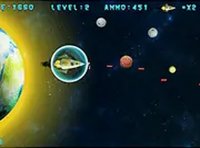
Spaceguard Online Arcade Game is a classic space-themed shooter that puts you in command of a fighter ship defending the galaxy. As waves of enemy characters descend from the top of the screen, your mission is to destroy them all before they reach the bottom. The game combines straightforward controls with progressively challenging gameplay, making it accessible for players of all ages. It runs directly in your desktop browser with no downloads required, and full screen mode provides an immersive experience. Each enemy destroyed adds to your score, and the speed and number of invaders increase as you advance, testing your reflexes and accuracy. This game is ideal for anyone seeking fast-paced action and a space-themed challenge.
How to Play
To play Spaceguard, use your keyboard or mouse to move your fighter ship left and right across the screen. Position your ship to aim at the approaching invaders and shoot to destroy them. The key is to eliminate enemies before they reach the bottom, as each one that gets past reduces your chances of survival. As waves progress, enemies move faster and appear in greater numbers, requiring quick reactions and precise timing. The game is designed for desktop use, so keyboard and mouse controls are smooth and responsive. You can also activate full screen mode for a larger view. Practice your aim and movement to achieve a high score and become a top defender.
Game Features
Fast-paced arcade action with simple controls. Full screen support for an immersive experience. Increasing difficulty keeps gameplay engaging. Free to play directly in your browser on desktop. No downloads or installations needed. Score tracking encourages replayability.
Tips for Success
Focus on staying calm and tracking enemy movement patterns. Prioritize targets that are closest to the bottom of the screen. Use short, controlled bursts of fire rather than holding the fire button continuously. Practice regularly to improve your reaction time and accuracy. Learn to anticipate enemy formations to position your ship effectively. Remember that each wave gets harder, so adapt your strategy as the game progresses.